Download terlebih dahulu file bahan yang dibutuhkan. Semua wajib didownload tanpa kecuali dan pastikan kamu sudah memilih tipe bahan yang benar untuk 32/64 bit sesuai infrastruktur PC kamu.
Jika sudah, silahkan extract file-file tersebut dengan menggunakan
Winrar dan pastikan sudah berada dalam sebuah folder agar terlihat rapi
dan mudah menginstallnya.
Langkah pertama, pastikan PC kamu sudah terinstall .NetFramework 4.0. Jika belum, silahkan install dengan menjalankan dotNetFx40_Full_x86_x64.exe seperti biasa.
Langkah kedua kita akan melakukan instalasi Java. Jalankan jdk-7u11-windows.exe
untuk memulai proses instalasi. Install saja seperti biasa dan pada
saat proses pemilihan folder/direktori, pastikan kamu sudah merename foldernya menjadi “jre7”. Jangan sampai salah! Jika sudah, silahkan buka direktori instalasi Java kamu (C:\Program Files\Java\jre7\).
Masuk ke folder jre/bin lalu copy semua isinya ke folder bin yang ada di folder jre7. Intinya seperti ini : Copy semua isi folder C:\Program Files\Java\jre7\jre\bin lalu paste ke folder C:\Program Files\Java\jre7\bin.
Masuk ke folder jre/lib lalu copy semua isinya ke folder lib yang ada di folder jre7. Intinya seperti ini : Copy semua isi folder C:\Program Files\Java\jre7\jre\lib lalu paste ke folder C:\Program Files\Java\jre7\lib. Kalau tidak mengerti, silahkan nonton videonya ya.
Jika sudah, lanjut ke Langkah Ketiga, yakni instalasi mysql server. Jalankan mysql-5.5.22-winx.msi untuk memulai instalasi. Pilih Typical Instalation
lalu klik tombol Install. Tunggu sesaat hingga proses selesai. Diakhir
proses instalasi, pastikan “Launch the MYSQL bla bla bla” sudah
tercentang lalu klik Finish.
Maka akan muncul dialog baru. Klik Next -> Detailed Configuration
-> Next -> Server Machine ->Next -> Multifunctional
Database -> Next -> Next -> Next -> Next hingga kamu menemui
kotak isian root password. Isikan kedua kotak tersebut dengan password “123456”. WAJIB. Jangan diganti passwordnya. Next kemudian selesai.
Langkah Keempat, instalasi SQLYog. Jalankan sqlyog_setup.exe dan
lakukan instalasi hingga selesai. Jika sudah, silahkan buka SQLYognya
lalu register dengan serial yang sudah diberikan. Pilih New lalu isikan
password “123456” kemudian save dan connect.
Jika semuanya sudah dilakukan, saatnya kita menginstall PB Offlinenya. Jalankan PointBlank_PTS.exe
lalu install seperti biasa. Sambil menunggu proses instalasi PB
Offline, klik kanan pada My Computer lalu klik Properties. Buka Advanced System Setting -> Environment Variabels. Kemudian, cari “Path” lalu klik tombol edit. Scroll hingga akhir lalu berikan tanda titik koma (;) dan pastekan ini : C:\Program Files\Java\jre7\bin Lalu Ok dan simpan.
Jika sudah, tunggu hingga proses instalasi PB Offline selesai.
Lalu, buka folder C:\Program Files\PointblnakPTS Setup\PBServer_Gaul Rev 8.3\pb_database\ dan jalankan setup.bat
tekan saja sembarang tombol saat dialog Command Prompt terbuka. Jika
sudah, kembali ke SQLYog tadi dan klik kanan -> Refresh Object. Jika
sudah terdapat tabel “pb” maka inject database sudah berhasil.
Selanjutnya silahkan buka shortcut yang ada di desktop dengan perintah Run As Administrator dan browse folder PBServer_Gaul Rev 8.3. Klik save.
Download PTE Patch Update 5.1 PES 2016 Terbaru Released 17/04/2016
- Online Mode Fixed - Missing GK gloves fixed - Added new faces - Updated some managers - Updated a lot of Brasileirão transfers - Removed more duplicate players - Fixed some players accessories, faces and stats - Other minor issues fixed * If you use the extra team mod, read the info inside, before install the PTE Patch Update 5.1
-
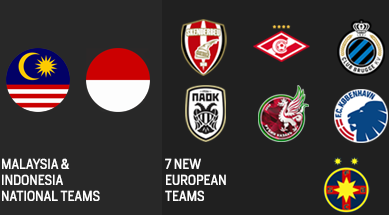
Added Kobenhavn, Club Brugge, Rubin Kazan, Spartak Moskva, PAOK,
Skenderbeu, Steaua Bucuresti - Fully licensed with correct squads,
lineups, kits, faces, stats & acessories. - Imported all the transfers, new players and tactics from the PES Live Update (March 17) - Brasileirão 2016 - Added Botafogo, E.C. Vitoria, America Mineiro & Santa Cruz - Primera Division Argentina 2016 - Added Atletico Tucuman & Patronato - New/Updated kits for: PSG and Eintracht Frankfurt - Added Malaysia & Indonesia national teams - Ethiad Stadium (Manchester City) added - Updated the Liga BBVA Bancomer - Updated managers for all teams - Added 40 + new faces, including for: Zidane, Ronaldo, Beckham, Rashford, Mayoral, etc. - Fixed accessories, shirt names, positions, etc for a lot of players - Removed all the new duplicated players from Data Pack 3.0 - Added new balls, including: argentum AFA 2016, Ordem3 CBF 2016 - Added new boots, including: Messi 15, Mercurial Superfly CR7 Natural Diamond, Nike Radiant Reveal Pack -
Added new gloves, including: Adidas Ace Zones Pro (different colors),
Nike Premier SGT, Nike Vapor Grip, Puma evoSPEED 1.4, etc. - KONAMI Data Pack 3.0 & KONAMI Patch 1.04.00 included - Online Compatible
#LAST PATCH FOR PES 16
This
will PROBABLY be the last patch for PES 16. From now on we will only
release updates, including big updates for the new season, EURO 2016
& Copa América 2016.
#WHY NO TATTOOS?
Because, the tattoos mod make the game crash, when a player with tattoos appears in a cutscene on ML/BL. For example, Messi with tattoos, in ML when he win the "Ballon D'or", the game will crash.
[PES16] PTE PATCH GENERAL FEATURES: - 1. Bundesliga 2015-2016 Licensed - Liga BBVA Bancomer 2015-2016 Licensed - Premier League, Championship, Liga NOS Licensed -
New teams: Rapid Wien, Midtjylland, Krasnodar, Molde, Lokomotiv Moscow,
Sion, Asteras, Legia, Bate, Malmo, Shakhtar, Dinamo Zagreb, CSKA,
Astana, Dnipro, Red Bull Salzburg, Anderlecht, Celtic, Fenerbahçe,
Besiktas, Plzen, Slovan Liberec & Crvena Zvezda - Kits for all the unlicensed National Teams - Kits for all unlicensed Argentinian and Chilian Teams - Real logos and names for all the unlicenced leagues and competitions - Added faces, balls, boots, gloves and sleeve bagdes - Added photos and names for all managers - Real stadium names for all teams - New stadiums added, correctly assigned to the respective teams - Patch compatible with the Greek and Russian languages - Patch compatible Online ________________________________________________________________________________ DOWNLOAD PTE PATCH
Matikan antivirus kamu, supaya instalasi dapat berjalan dengan lancar
Download PTE Patch 5.0 melalui link di atas
Ekstrak file yang sudah kamu download tadi dengan WinRAR
Jalankan Setup1.exe, kemudian install di folder PES 2016 kamu
Setelah selesai, maka akan otomatis terbuka Setup2.exe
Install di folder PES 2016 seperti tadi
Di akhir instalasi, akan muncul 2 pilihan versi PES 2016
Pilih pes2016.exe 3DM Crack
Jalankan PES 2016 kamu
Selamat bermain!
________________________________________________________________________________ DOWNLOAD PTE PATCH EXTRAS - STADIUM PACK BY ESTARLEN SILVA - ADAPTED FOR PTE PATCH: - ZYPPISHARE: PART1 - PART2 - PART3 - PART4 - PART5 - DIRECT LINK:PART1 - PART2 - PART3 - PART4 - PART5 - This is not a pack created by PTE so, the stadiums are not correctly linked to their respective teams.
- If you already have the stadium pack installed in the PTE Patch, you
dont need to download again, just make a backup of the file
"ptepatch_sta" who is inside the "download" folder of your PES 16
installation folder, before install the new patch. DOWNLOAD PTE PATCH ADBOARDS PACK ZYPPISHARE1: DOWNLOAD ZYPPISHARE2: DOWNLOAD ZYPPISHARE3: DOWNLOAD
- If you already have the adboards pack installed in the PTE Patch, you
dont need to download again, just make a backup of the file
"ptepatch_adb" who is inside the "download" folder of your PES 16
installation folder, before install the new patch. ________________________________________________________________________________ CREDITS Konami, PES Logos, danyy77, buffon99, klashman69, zlac, Jenkey, cabry, fruits, moody, pesmonkey, -InMortal-, gabe.paul.logan, pimplo, donkscrispo, muske25, nemesisk, gasparzinho, VinVanDam, Estarlen Silva, a7med sb, cRoNoSHaCk, barcafan, Tunizizou, ramy, Tasci, Cuky, Maritimo, AMussolini, steadyontherem8, Wens, Tisera09, killer1896, SantyArgentina, Znovik_S, pantelg7, rednik, Kairzhanov_21, spiritusanto, KOH, HD3011, Hawke, Andry_Dexter11, MarioMilan, smeagol75, starvin, juce, NikoLiberty4, boonaun, Txak, Tizziano, TwistedLogic, basilhspa013, Kuzmich, GOALARG, Swoosh1968, Bilgehan Alpaydin, Baris Yerlikaya, Killacarrillo, Shram, l4vezz1, oxarapesedit, vangheljs, AdrianMedina, alexis2323, viper12, G-Style, wygno, ZZ-TOP, elargentino91, IDK, FarhanA